Saturday, 22 December 2012

Web Hosting at Your Home (Revisited)

(For the latest PDF files Merger Software please have a look at the top of the left margin, inside the red box.) From the time that I wrote the post on this topics, many things has changed. Now, I revise the material.

First, you need a dedicated computer to install and run your webserver on that. I used to use an old laptop; it was older than ten years. Regretfully it made a lot of noise during the night cooling the CPU. CPU was 2 GHz, but with small CPU cache it was killing slow. It still had some customers to earn some cash, so went on auction site and "bid" farewell. As I have a very cheap and high quality paid hosting, I didn't bother to replace the home web hosting laptop. I put the home hosting on my computer, hence when I hibernate the computer or shut it down it is not visible anymore.
  • Therefore, if you want to use an old laptop as a server consider how far it is still useful. You frequently have to work with it and if it is too slow, it can make you impatient. It is difficult to upgrade its CPU and impossible to improve its cooling mechanism. It also consume some electricity and it creates some noise.
  • If you decide to use an old desktop (tower) computer, you easily can upgrade it to a more powerful one. You also can get almost good computers with very low prices on auction sites. They consume more electricity and for tuning you need to connect keyboard, mouse and screen to them. Their noise also might be too much.
  • Considering expenses all together a web hosting at home might not be profitable comparing to a purchased web hosting mostly under $40, $50 a year. But it is rewarding in terms of having a hobby. If you have a small business and hoping to develop it or it is growing it is a good practice to keep your IT operation under your control and within the horizon of your understanding; then web hosting at home could be a good exercise to that ends.
  • Call the computer of your home web-hosting your "web server" after this.
Second, download and install Apache HTTP (web) server to your home web server. To do that
  • Create a folder in the root directory of your web server as C:/Apache Software Foundation/Apachex.x where x.x stands for the version of downloaded software. Mine is Apache2.2. 
  • Install Apache server and during the installation instruct Apache to be installed in that C:/Apache Software Foundation/Apachex.x folder.
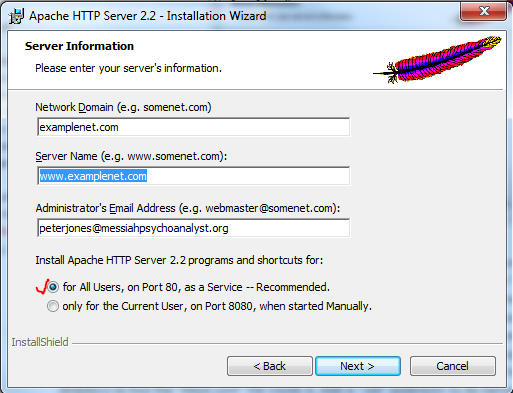
  • Fill in the installation form of Apache. You can fill its field with anything that looks like a website name and email. Later you can correct them in conf/httpd.conf file.
  • Open htdocs folder inside Apache2.2 and double click on index.html if it opens and shows "It Works!" then you have been successful so far.
  • If succeeded change name of index.html to indexold.html.
Now it is time to bring your website into your home web hosting.
  • From wherever you have saved your website copy all the files and folders and paste them inside the htdocs folder of your Apache.
  • You have a front or home page. It could be home.html, index.html, or default.html. Extensions could be html or aspx or other accepted extensions. Make a copy of that and change its name to index.html. Having done this you do not need to tweak with conf/httpd.conf file for now; until later that you become an advanced user.
Log into your router, normally by typing 192.168.0.1 (or in some routers 192.168.1.1) in your browser.
  • Find the IP address of the web hosting server computer of yours from the "Connected Devices" section. It should be something like 192.168.0.7
 While still  logged in the router note that in all routers there is an "Advanced Settings" and inside that a section for "Security" settings. Among the "Security" settings you'll find a "Port Forwarding" area. Enter in "Port Forwarding."
  • Select HTTP for name of the "Service."
  • Select TCP for "Protocol."
  • Enter IP of your web server computer into the IP field (192.168.0.7).
If you are in Windows XP this is fine enough. If you are in Vista/ Windows 7 or Windows 8, you need to instruct the Windows to make an exception in the Firewall to allow inbound traffics for your web server.
  • Open "Control Panel" and then open "System and Security."
  • Click on Windows Firewall to open its dialogue.
  • On the left side list find "Advanced Setting" and click on it.
  • A "Windows Firewall with Advanced Security" dialogue will open.
  • On the left side list click on "inbound rules."
  • Now on the right side list click at the top on the "new rule."
  • Among the selection radio buttons click on "Port" and the next.
  • In the next dialogue click on "TCP" radio button and then specify on the "Specific Local Ports" by typing value 80 in the field and then next.
  • In the next dialogue leave "Allow Connection" as it is selected by default. Click next.
  • Well your web serving computer is in your home. Hence in the next dialogue you need to select "Private" network by ticking the box. Click on next.
  • In the next dialogue select a "Name" for your rule such as "My Apache Web Hosting." Click "Finish" and you are done.
After setting up the new "Firewall Rule" type http://localhost/ in your browser. That should bring your home page. Look at your browser it is just http://localhost/  with no index.html or anything after that. This is a good lesson for later tunings. Now click on your "Home" link (you have that link somewhere in your front page), then browser changes to http://localhost/home.html or http://localhost/default.aspx or whatever file you have as your home page. I decided to have mine as default.html since I found it more comfortable to work. I have three similar copies of my home page as index.html, default.html and home.html inside the htdocs folder of my Apache.

You have your web server hosting at home up and running.
  • Get your main internet service IP from your router or by typing "my ip" in your favourite search engine. It should be something like 87.321.46.18 (this is not a real IP as one of the numbers is greater than 255 which is impossible).
  • Ask a friend to type that IP in their browser. Check if your web hosting is visible for them.
Hopefully you have done all you need at home for your web hosting. It is disappointing that it is visible only for your acquaintances. Next make it visible for the world.
  • One solution is to get a free subdomain from numerous provider. They do it in a hope that one day you are going to get one of their paid services. Once they get enough clients, gradually they kick out free nerds with excuses. One I am using is DNSdynamic. They provide you with a free client to be installed on your computer. You do not need this client in principle. I'll explain for you in a minute. Sign up to their site and select a name for your site, say homelyhost, then your address will be, say, homelyhost.dnsd.info. There are other options besides dnsd.info. Mine is messiah.dnsd.info. These types of names does not look much exciting.
  • While logged in the DNSdynamic website, or wherever, use their provided instructions and point the name (say, homelyhost.dnsd.info) to your IP (87.321.46.18).
  • Log out and test the name in your browser. Sometimes it take 24 hours that things become sorted out throughout the worldwide network of Internet.
Reason for installing the client is that normally people have dynamic IP which is subject to unnoticed arbitrary change by their Internet Service Provider (ISP). You do not need the client as much since due to technical issues IP addresses will be kept static and without change for a long time and years if you do not move from your present address or you do not change the Service Provider.
  • You can check your IP every now and then, perhaps on a daily basis, and if it had been changed log into your member page at DNSdynamic site and point the name to new IP.
  • Alternatively you can buy a static IP.
(Update 26/April/2014: As explained here and I expected DynDns that I already had, has informed me that they can't continue providing free services anymore. Their offered prices are so unreasonable as if they are living in another planet. I moved to DNSdynamic.org, and edited this blog post, accordingly. They look very innocent now.)
You might like to buy a name for your web site that you are hosting at home. You have not much options now a days for selecting cool and conspicuous names. They are already gone or big companies have bought them, in speculation, to sell them to wealthy people, celebrities and companies who need such names. Even misspelled names are sold already for famous brands. If you type in browser say foerd.com you might get to ford.com, for instance.  They also may use it for "parking" sites. If you browse by misspelling ford as foerd you reach to a site that has parked advertisements for car selling/repair/used-car companies and during the year might bring few hundred dollars for its owner.
If you need very ordinary name, especially long names, these names are sold on a yearly subscription basis and are not expensive. They are from $5 to maximum $25 per year. I bought a dysprosiumsoft.com for $8 a year.
I pointed it to my webhosting at my home, but how. Sites such as DynDns asks paid subscription to provide such a pointing service which is called DNS or Domain Name Services.
  • You need to use a free DNS provider.
  • There are many of them out there with the same rule: when they get enough people convinced to upgrade to paid service they kick out the remaining die-hard non-paying nerds.
  • I found freedns.afraid.org more nerd oriented than others and very easy to configure (© 2001-2014 Joshua Anderson, Free DNS is currently processing 4,373 DNS queries per second).
  • I signed up to their free subscription and followed their instructions to point their DNS to dysprosiumsoft.com and then dysprosiumsoft.com points to my IP. Click on http://dysprosiumsoft.com and if my computer is on (mostly GMT : 8 am to midnight) you will see my web hosted on my own computer. It is also the same pointed by http://messiah1.ddns.net/. They both land on the same folder. I have one folder for home web hosting but I have pointed two names to it; similar to foerd.com and ford.com that points to the same site such that if people make a mistake while typing in browsers they land on the same place. I have added a small tag at the top (Home Web Hosting Demo) to be recognised from the out-sourced professionally hosted http://messiahpsychoanalyst.org.
  • Click on the W3C validation at bottom. It becomes validated similarly.
Believe it; it needs some patience.

(Disclaim : names I used in this note are those I am using I have no idea regarding recommending or endorsing them. Though I am thankful to them but you might prefer using your favourite search engine finding similar services)

Please also see a newer post Web Hosting at Your Home : PHP and Port Forwarding Conflicts

Monday, 31 October 2011

What News About Dysprosium?

(For the latest PDF files Merger Software please have a look at the top of the left margin, inside the red box.) This is an obsolete content. Some updates can be find at the bottom of this post. I promised a release of Dysprosium Suite before the end of this 2011. I could not eliminate a serious hurdle on the way. I could not find a PDF viewer that seamlessly joins to Java. I mean a free viewer. There had been an excellent free Java viewer by Adobe developed ten years ago. It means it is based at best on works started before the millennium. It works still perfect if your created PDF be of the type you might create by the latest LaTeX tools (such as MiKTex) or by Adobe Professional tools. It does not even load a blank page which is not created in this way. But most of the people use everything to create PDF; such as, Google Docs, or Open Office, and many scanner to PDF software. Such cases crashes the Adobe Java viewer. Adobe for unknown reasons did not continue the development of that software, and its present free software SDK is pure C++. I worked to switch to that tool but there is a further hurdle since this SDK utilizes MFC proprietary libraries and include files. I tested every available claimed free Java PDF viewer, but actually they all have a mistake. They are not Java Swing. Adobe viewer is a pure Java Swing. It is so malleable that you can give them the "group layout;" a very Java Swingish layout. But I succeeded in pushing the limit of merge to astonishing 3.5GB in 64 bits versions of Windows 7 and Windows 8, with enough RAM memory. I had 32GB installed and put 4GB of it available for Java heap. CPU was quad core and never exceeded in 10% usage for each core. FSB was 1600MHz. This is the biggest PDF file you might find. The other reason that I did not switch to C++ is the belief that I have on Java programming. It is much more natural than C++. (I am a C language fanatic, but not C++) Well, C# is somehow Java. But it is not free, for full blood development. (It was a strategic mistake, in terms of nerds commenting, that Sun pushed against usage of Java by Microsoft. Otherwise, there could be more harmony in the present sphere of development tools.) Switching to C++, or to C# will change my work as a retired person to a full time professional developer. I am going to create a separate package with Adobe Java viewer with no guarantee of being usable on loading every PDF. I am going to develop one without viewer, besides. Please have a look at the snapshot.
It is a document created by the LaTeX (using MiKTeX). Book includes extreme fonts and sophisticated images. All 74 pages are loaded nicely. Yellow color has been used to create contrast for this demo. The next document is a one page document created by Open Office. Only one word is written on it. It dispatches error upon loading.
There was, another disappointment, too, in lack of much progress in breaking the password of PDF. I was interested in its mathematical side. A brute force multi threading could break a password of 5-character length created out of 64 characters in a reasonable time. Hence, we have "Remove Password" button (on condition that you have the owner's password) but not the "Unlock Password" button.
Update, May 2016 : Dysprosium (Dolce edition) has been released (please click) based on iText from mid of April 2014 and smoothly on a nightly basis added more features and now I have deprecated many scattered pieces of PDF utilities I already released. There are so many features that I cannot write complete instructions for all of them. From other previous pieces only Signature manager has been remained to be integrated. I sorted out PDF viewer problem somehow satisfactorily.)
(updated : 26/May/2016) I have had over 60,000 downloads from 187 countries. All around the world, only 1 country in South America (French Guiana) and 1 countries in Asia (Democratic North Korea ) have not used Dysprosium Software, yet. The remaing countries not downloaded to this date (less than 10) are from the central Africa and perhaps some very small Island countries.
(Deprecated Paragraph : People contacted me regarding not fulfilling promises in creating an integrated software for different pieces of dysprosium in on single -and perhaps bloated- suite. My friend Grant Hardy is too busy with electronics and doesn't come around. Phoenix  is also has committed himself in different web developments. I have been left alone and I am too old and feeble, but have progressed in some areas. For example, I have created a Complex Polynomial Calculator; download here. I postpone my promises towards end of this year. We had some joy with majority of algorithms in recovering lost owner's passwords. Well, I succeeded in a relatively fast password cracker but won't publish it. People who have lost their password might like to use other things available out there. We fulfilled all  promises at this date 26/May/2016.)


Sunday, 7 August 2011

How to Create a Free Web Hosting in Your Home? (2)

(For the latest PDF files Merger Software please have a look at the top of the left margin, inside the red box.) Next you need to test your IP address on the Internet. (Please also read the previous post.)This is different with your private hub IP addresses. It is the unique address given by your broadband service provider to the location of your router on the entire Internet.You can get it on different places.
For example, log into your router and click on "Basic Setup" you find it as

It is something like "98.227.112.49" This number is as good and working as any important site such as www.un.org or other sites. Ask a friend to type that IP address in their browser and voila! He will be directed to your hand-made web site. Remember from the previous post that if your default home page is not "index.htm" you have to configure "httpd.conf" file accordingly, or type "http://98.227.112.49/home.html". You have a web hosting of your own free. This IP address is subject to arbitrary change by the provider. It is dynamic for ease of maintenance. People join to and opt out from a provider and their address will be given to others. You also may change the provider or your residential. It also cannot be remembered easily. It needs a mnemonic to help to memorise. There are companies on the Internet that provide you with a free client software for maintaining a constant connection of the Internet with your potentially changable IP through a mnemonic of your choice. These companies are called "Dynamic DNS Provider" or such. You can use your favourit search engine to find one. By client I mean the old PC that is being used for your in-the-home web hosting. It is necessary that you subscribe to such a free service. Then download and install the client software on the "client" following their simple instructions. This mnemonic is not a top level domain such as www.anexample.org. It is a subdomain such as "subexample.anexample.org" Mine is messiah.dyndns.inf. I got dyndns.inf from free DynDns' many available options. I mention their name as a gratitude to the free service. If you like to have a top domain name, then you have to buy one by paying £5 ($8) (at the time of writing this article) a year. Many of more attracting names are being used by others or are bought to be kept to sell for higher prices. After purchasing that domain name or if you already have one, then you can redirect your top domain name through that dynamic IP provider to your home made web site.  dynamic IP provider tells you how you should do that. (freedns.afraid.org starts by default from a top domain name of yours. Their dynamic DNS service is also free. With £5 ($8) a year (at the time of writing this article) you buy a domain name from any seller and then redirect it through dynamic dns and nameservers of freedns.afraid.org to your home web server.) You should follow guidelines to maintain your down-time to minimum per year. It is easy to surpass in quality over an expensive web hosting if you minimise load of that web server machine. Do not use it for other purposes and do not put more than the minimum of operating system software on it. Uninstall additional software (sometimes called bloat-ware) that comes with an operating system and has not any use for your web server. It is possible to gain an old PC with an OEM Windows XP installed under £20 ($30) or sometimes drastically less than that on the eBay now a days. You can upgrade it to a 3GHz CPU, 3GB RAM. The bad thing about a desktop PC is its electricity consumption and noise that it creates. Bad thing about old laptops is that you cannot upgrade its cpu easily and old laptops normally cannot accept  more than 1GB of RAM. By the end of 2012 Britain will be the first country that all its communication network will be on the Internet. There will remain no conventional telephon switching after that. Thanks to optical fiber on your door, speed of connections are not subject to trafic load and distance and is constant all around the clock. Hosting at home is the next asset that you can have besides being just consumers of  the other web sites. At the end this is very pleasing job to accomplish. It is fulfilling like ham radio and DXing, when you were producer of your own equipments instead of buying them. After preliminary set up of the site, there'll be many Elmer's notebooks on the Internet that paves the way towards full professionalism. For example, click on this link, http://messiah.dyndns.info/CodesForUs.html. You can find that I have moved part of this blog on into that web site at my home. (Thanks to Grant Hardy who edited this post from the US)
(Update : See also this post Web Hosting at Your Home (Revisited) )
Update, 25 March 2014 : You might find these two wikis useful, too.
They include images and are step-by-step.

Moving from Microsoft Office Live Web Hosting (3): How to Create a Free Web Hosting in Your Home (1)?

(For the latest PDF files Merger Software please have a look at the top of the left margin, inside the red box.) If you are on a broadband and have an old computer or laptop and have a taste of hobbyist tinkerers jobs, you might be eager to become your own host for your website. (This is a continuation of two previous posts in moving from OL.) That could become more powerful than a purchased hosting. You need to download the Apache http Server which is a free software (GPL compatible) for serving your website to public. Install Apache server on your old PC. Well, my platform is a Windows XP Professional SP3. I have not tested that on a Unix yet. I'll do it and update this blog. I double click on downloaded software (it is Microsoft Installer file format, .msi). After some routine procedures, this dialogue asks me for some information.

Information I put could be arbitrary. Later, I can configure them if I like. Next I select a custom install.

I have an Apache home directory already in my computer as "C:\JavaHome\ Apache Software Foundation" inside my Java home directory. I change the default of http server to this directory, as "C:\JavaHome\ Apache Software Foundation\Apache2.2"

Yours also could be any directory of your choice. After finishing installation, an "Apache Server Icon" appears on the quick launch tray of your desktop. Inside the Apache2.2 folder there are other folders. Please open "htdocs" folder and double click "index.html" it opens in your default browser showing "It works!" as the sign of success in correct installation of Apache http server. Next to "htdocs" you may notice the "conf" folder. Please open the directory to find the "httpd.conf" file inside it. Add a ".txt" extension to its name (i.e., httpd.conf.txt) to be able to edit the file in a notepad. (Frequently I open many of such files in NetBeans IDE). Find this line inside the document (it is line 179):


You have to change the "DocumentRoot" to your desired directory. I have created a "C:\Web\MyWeb" directory on my old laptop. Hence, I change to:

Please not I made the original one commented out by putting  pound (#) in front of the line, and added my own home server directory in its place. I immediately make "C:\Web" directory shared in my Windows "WorkGroup" such that I can work on it from my desktop PC. In this way I never have to go physically to that laptop anymore. This sharing is only on your own Work Group and is nothing to do with public network. Please go further down in the Config file to get to:

Change it as to your newly created root directory of yours,


Now save and close this file and remove the ".txt" extension from its tail back to its original "httpd.conf" Left click on the "Apache http server icon" on your desktop tray and then click on "Restart" on the drop down menu choices. tool tip text shows "All Apache Services Running" Now start to create your web site. Open "C:\Web\MyWeb" directory and on a note pad create any simple html. Then "save as" it as a index.html, or default.html, or home.html. I am running everything from default.htm as I have transported my web site from Microsoft Office Live (OL) and like to minimize my workload during the transition. I have created all three with similar content. That makes it more transportable. But, please note that "httpd.conf" file has a default of its own as the "index.html" that serves on connection. You know that when you type "http://www.anexample.org" in your browser. It brings a default page such as " http://www.anexample.org/homepage.html. " This can be determined in the "httpd.conf" file as we can see,

You can change it to home.html or default.html or comment it out by putting a pound (#) sign in front of  the line 242. If you do not create an "index.html" page as your default home page, the www.anexample.org opens a page with a folder/file tree of your websites including everything you have in the "root directory" you created above. To check that I delete my index.htm page. I have three links here for the test: http://messiah.dyndns.info/ and http://messiah.dyndns.info/Home.html and http://messiah.dyndns.info/Default.html (These as I said could be slow or down due to I turning off the old top.) Later, I explain where "dyndns" comes from.
In the  same directory I create four folders as, "documents" and "images" and "cgi-bin" and finally one I need as "PDFs" One might like to have other folders such as "downloads" or "stylesheets" or"JSes" and so on. In contrast to that, I put my css files naked next to index.html, also if any js file. I have none of this type yet. Next I should open the firewall to allow access of the Internet into that server. I log into my router. (I can log from any computer on my hub.) I click on "Port Forwarding Option/Port Triggering" in my NetGear router it is like this:


Your port forwarding could be blank, so you need to "Add Custom Service." Fill the necessary fields, as described. "Server IP Address" is the fixed IP address given by the hub of your broadband router to the old computer that you are using for your home web server. You can find it by clicking on "LAN Setup" on the left hand pane of the router. I found it as "192.168.1.7" for me. It almost always starts with "192.168.0" for all connected device. Mine starts with "192.168.1" for all device.  After configuring the "Port" please type http://localhost/ in your browser (local host is the loopback to your web server) or if you have a "home.html" type http://localhost/home.html in your browser that takes you to the home page of your "Home Made" website. Next, "How your site becomes visible on the Internet?"
(Update : See also this post Web Hosting at Your Home (Revisited) )

Wednesday, 13 July 2011

Moving from Microsoft Office Live Web Hosting (2)

(For the latest PDF files Merger Software please have a look at the top of the left margin, inside the red box.) Already I have checked that how far my web pages are relying on Microsoft Office Live (OL) css files on the host servers. Wherever I go I should have access to these files. I know that those files and  their paths remains on-line for a while but if in a weekend the host decides to deprecate all of them, decommission the old servers then I'll be in trouble. Although some people have put them available online, I should have a copy of my own site saved on my own desktop or somewhere in my possession. It is easy to extract them. I give their paths to W3 CSS validator, (click) here. To find the path you can right-click on your pages in the browser and open "View Source." In the document, inside the <head> part of the document. You will find the links to css files like this,
<link href="http://cdn1.officelivecontent.com/2.02.4131.0/WebHosting/_layouts/1033/wh/stylesV2/masterroot.css" type="text/css" rel="stylesheet" />
Copy http://cdn1.officelivecontent.com/2.02.4131.0/WebHosting/_layouts/1033/wh/stylesV2/masterrootto .css part and past it on the text field of W3 CSS Validator and press "Enter." All the CSS file content comes on the page. Copy them and paste on a notepad. Save it as, say, masterroot.css and keep it. I have put my used files, MasterRoot, Tables, and Theme available if you like save them and open them on notepad or using your favourit editor. The file can inspire you, later, when you become more aggressive towards building your site with richer interactions, to modify it and customize it and perhaps correct it on established standards (e.g. use % for font size rather than px or pt) for your personal requirements. Look inside the CSS files, find out what you do not have as your own asset such as, url('../../../wh/images/icons/slideshow_buttons.png'), but you are using them in your pages. Right click on that resource on your related pages and save the pictures with its defult name on your own computer. Later, chang that URL to url('/images/icons/slideshow_buttons.png'). Now, you are ready to be weaned from free milk and it is necessary to pay couple of pounds (you might have to pay dollars or euros) per month. It's worth having it if you gain ad-free hosting, with unlimited disk space, bandwidth, and diversity of uploading file formats. So far my website was very simple. I even could not add a download counter to it. It was enough for me since I do not have a business to promote it on my site as a show window. I do not want to be employed either to attract the head hunters. Nevertheless, I like to experiment new ideas and write them down.  After lot of research I could find a place to meet my demands in having a hassle free hosting. That gives me a free domain name if I need one. But I did not need another domain but what now I have and easily can transfer to them as registrar of the domain after now. I can keep the present registrar but my selected web hosting has a scheme that helps a life time free domain name registering. As I am a retired person I like to have a guaranteed place to keep my website at least for ten years after me. I had to select a place that already has shown that resilience not like mushroom firms that come and go without being adhered to any liability. The very cheap hosting I found is the oldest in the market too. I liked to have the best customer service. I have many questions and cannot adventure on googling questions and ramble through forums that you see questions are asked in 2005 and by now has not received any answer. I did not like to receive everyday an unsolicited email to ask me to upgrade to a VIP or pro or such type of equivalent products. I needed to have secure place with up-time almost near to 100 percent. I found it here. I am paying £3.0 ($4.5 US) a month.
(This site is an ad-free education site but for only from 1/March/2012 to 30/April/2012 as a help to pass my experience to many who have to move from free OLSB before 30/April/2012)Disclosure: I am a professional able to review IT related products and may receive compensation from the company whose product I advised here, ONLY if you buy through this click (you also may get discount). I tested the product thoroughly and give high marks to only the very best, but I do not accept ANY paid reviews at all. I do not review any other product on any of my ad-free, non-commercial sites and the opinions expressed here are my own.
I paid $162 ($132 +$30 VAT) for three years. At the portal there is no mention of  VAT. Therefore the VAT is hidden from the potential buyer, which is not acceptable for me with the ethics of a teacher. There was no mention of the fact that for the non-profit organisations they have cheaper plans. Also this is an introductory fee. Renewals are as much as twice of this price. I might decide to renew after three years or even make it automatic due to my age. However, many of the people now a days use the "switch-to-next-cheapest-offer scheme." Competition is fierce and diverse in webhosting and gradually in cloud computing in general. See, purchasing car fuel or domestic utility or even Internet Service Provider or cable TV normally narrows down to limited sources but it is not for things such as the web hosting. There are cheaper introductory offers but not as good as this one with such a long track record of hosting. Immediately after subscription I uploaded all of my OL pages as html to my dashboard into the root and into the folders that I have created. I uploaded my CSS files into the root directory. Using their robust editor, I corrected the above mentioned codes to
<link type="text/css" rel="stylesheet" href="/MS_MasterRoot_CSS.css" />
 Purposefully I changed names of the CSS to my desired ones. I uploaded all the images, too. In contrast to OL, I could organise files into the subfolders. I uploaded CSS files into the root. In half a day my site was up and running with a look completely similar to my OL site. You can compare this two sites at (click here please) OLSB (07/March/2014: no longer exists) and at its new (click please) host, or even on my home toy Apache web server that I have implemented on an old laptop (please click here; this could be slow and sometimes down due to turning off the laptop).Structure has completely migrated in half a day. Details, I have time and gradually do them. I have left the green default of OLSB background as it is (when you refresh a page it flashes green). It is for the test of my codes. Later I change it to transparent in the CSS. Please look at the bottom of the page it is validated by W3C, both for html code and for the CSS. I put this page for comparison since in its creation I only had used OL default aspx editor, not my own html pages launched from the "Documents Gallery." Due to more control on style, my new page is more meticulously designed. Bulk of my work have been done. I am enjoying my new freedom. I have loads of things ahead to do and to learn (thanks to my friend "Phoenix" for his discussions). A panic has happened among some, perhaps more than half of the OL free guests. It is as easy as this to solve. I have worked on Google hosting almost from a year ago. It is very basic and rough and inflexible. It is good to practice things around but not rely on it to be used as a host. It has no place for any adventure and is far more basic than OL with no guarantee of any customer service. Next, How to Create a Free Web Hosting in Your Home?
(Update : See also this post Web Hosting at Your Home (Revisited) )
Update 07/March/2014 : by doing differen experiments and as it is now well known for all designers, I demolished my entire web, built it based on HTML5, CSS3. My site follows a single CSS file. Using tables for layout and partitioning of web pages is completely wrong. Search engines ignore most of the contents inside any table rows and columns. I built all the pages with division (div) html tags. I created templates for pages and in a production line manner, I exported my pages to new layout. CSS3 has facilities for header, footer of pages, for different media, images, video and so on and compatibility with older Internet Explorers versions can easily be overcome. Poor parts of the world might still use IE versions before IE9, but it is their own choice since they can use free and modern versions of Mozilla browsers. I easily have created my own wiki, php files, download counters, and even (though not necessary) a basic analytic.  I have a back up of my site on my own personal home web hosting (and also on a 700MB CD) that enables me to change to any host at any desired time. Therefore, good bye to everything that is not under my own control and understanding.

Moving from Microsoft Office Live Web Hosting (1)

(For the latest PDF files Merger Software please have a look at the top of the left margin, inside the red box.) Frequently in the past I have written about tuning of Microsoft Office Live web hosting. This was a generous flexible tool offered by Microsoft essentially for small businesses to help them to have a decent hassle free presence on the web without cornering them to buy anything from the host. You even could remove that small font link and logo of the host at the bottom of created page. (I never removed it, as I believed that should be promoted; when one gets one should give.) Its editor was the best in terms of robustness and flexibility and design among any on-line editor I ever had experienced. One could bypass that editor by creating his own page and launching them from the "Documents Gallery" of his own. Not that you could produce one of those aggressive websites with different capabilities that is possible to run from a full blooded paid hosting, still enough to learn and keep the fire aflame. Besides tens of thousands of small businesses using that facility for income, there were ten folds of them used the hosting for personal non-profit applications such as educators, charities, different churches of different religions, artists, writers, political protagonists, anybody who wanted to have a voice on the Internet or had something to offer free to the public. This was a great altruism.  And one knows that altruism pays. When a computer enterprise promotes free presence of public on the Internet, at the end there'll be a queue of enterprises in some indirect manner in front of its own sales department. But should not forget the lesson of Sun Microsystem. Sun was a computer "Robin Hood," earning from big enterprises but lavishly spending for any geek (perhaps I mean cool) ideas around. It was a funky cafe, in the eyes of nerds to come and test their tastes. I frequently had received free Amazon vouchers, tee shirts, mugs from Sun just for writing a couple of lines as a comment, or a good bug report, without ever asking. There were supports for hundreds of projects without obligation to finish them. Free software, tools, and tutorials were available in every corner of Sun Microsystem, in galore. Return was good as Sun was enjoying having seven billion dollars just in cash in its backroom safe. But when enterprises started to fall, that cash was spent in few months without Sun having a cushion from backbone of more population. Oracle took over the Sun and accepted prudently many of the legacies of Sun Microsystem. Oracle has not any bad reputation as an aggressively business oriented company. Even I do not believe, in spite of many contrary ideas, that such a bad reputation exists for Microsoft. Essentially IBM, Microsoft, Oracle, Sun, Intel, Google, and many other similar companies are based on a founder and a population of employees mostly from the nerds with deep tendency to fulfill a mathematical curiosity than earning the money. Still, I believe, Oracle should keep the name of Sun in a similar way to that of Ohm, Siemens, Volt, Watt, Ampere, and such reputable names. I fell a bit far from my original discourse. Now, Office Live is being shut down. At first, I was somehow bitter, hearing the news. However, now I understand why Microsoft has made such a decision. It was not possible for Microsoft, especially in present financial situation of the world to maintain an activity which is not part of its expertise and statement of mission. Add the fact that most of those customers are not deeply engaged in design of a website. Microsoft has offered a paid hosting as part of the Office 365 on-line suite. That Office 365 is a good and well designed product seamlessly coordinated with Microsoft Office, but its web hosting is far weaker and more basic than Office Live and for one who needs only web hosting is useless and expensive. Therefore, many of OL users are decided to move. Thank you Microsoft for hosting my site. I learned many things from you and received support of a paying customer, but now it is time to adventure in open space and stand on our own feet. How can we move? It is subject of the next post.
(Update : See also this post Web Hosting at Your Home (Revisited) )

Wednesday, 16 March 2011

W3C Validator Compliancy for Microsoft Office Live Web-Hosting and Facebook Buttons (2)

(For the latest PDF files Merger Software please have a look at the top of the left margin, inside the red box.) I needed to add few words to my previous comment when I was experiencing for compliance of my website. First, I said that I use Microsoft Office Live (OL) templates. That is a good practice. Design of OL templates are done by the very competitive professionals in the industry. Thus should not be retired easily. An example is implementing the idea of  "zones." That makes doing things easier. Or the site maps so neatly designed. Or the OL visitor reporting Java Scripts. I keep as much of them as possible. I use all the facilities provided by OL such as their css and js files. I learn lot from them. Still, if I would not create my web, based on pages loaded from Document Gallery and I had limited myself in using pages created solely by the Microsoft Office Live, then I could not use a panoply of editors and other tools that I have on my ease in my local computer, without being have to sign in and open the OL console. I create my page, on my own desktop, by adding an "_AA" to the beginning of the file name. That takes it to the top of the list of OL Document Gallery and when I delete it to put a new one I do not delete a working page inadvertently. I test the page and debug it completely. I add the validator codes to it to be able to test it frequently. W3C validator also helps in finding and removing errors of the page. I delete and upload again and again and when I become sure about all aspects of the page then I add its file name to the directory of my web site. I change its name to whatever it should be, and then I upload it. On the other hand I have implemented an Apache web server on an old laptop at my own home. That mirrors my OL website and is connected to the Internet by a DynDs free domain name (perhaps later I can convey my observations about how to set up such a facility at home). My OL site pages, both root and Document Gallery pages have dependencies to different css and js and asp files from Microsoft hosting servers. On my toy home server I try to reduce all those dependencies to nill. I do it in a very neat manner with a system analyst approach. For example I do not create new dependencies to new providers, say free cgi hosting or other freely offered servers or thirty days trials. It has one root page, and a document gallery (Documents folder), and an image gallery (Images folder). I can add my own css, js, cgi, name space, and experience with ajax. I try to make it robust and be validated with strict standards. It is said that web designers should not have qualm with W3C validator or other strict QC criteria, and it is a geek obsession to meet such strictness. As an example you frequently hear that an average Amazon page has 17000 error and warnings through a W3C validator gauging. This is not a relief. Computer is the product of very well organised people specially pioneer system analysts. If during the design we follow few easy steps then the entire Internet becomes more smooth and cheaper to experience for those who are only users and actually pay back the expenses of the producers and have not time for technical difficulties that might be the result of relegating the standards. After all, I backup my entire site on a DVD.  In this way my web site will be completely migrate-able in a snap of finger. It is like a duffel bag ready to be deployed anywhere. My next goal is to validate this blog spot.